6. SDK Overview
The Walker Tienkung humanoid robot SDK provides a rich set of interfaces covering motor control for various body parts, IMU (Inertial Measurement Unit), voice, battery, remote control, and more. It can be used to write and deploy robot applications, aiming to help developers quickly and flexibly build their own applications to precisely control and use the robot to meet the needs of different application scenarios.
6.1 Basic Framework - ROS2
1. Walker Tienkung·Embodied Intelligence System Basic Framework
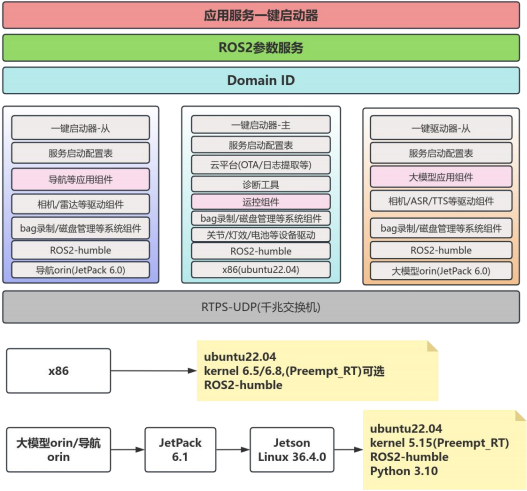
2. Walker Tienkung·Voice & Vision System Basic Framework
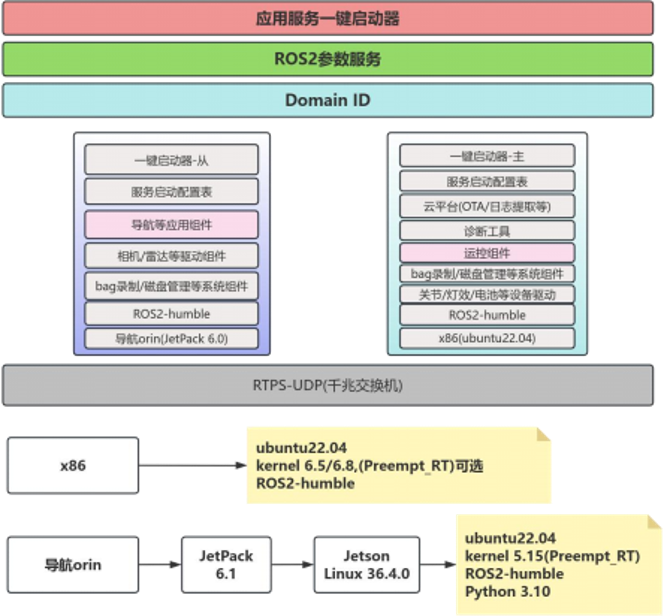
3. Walker Tienkung System Basic Framework
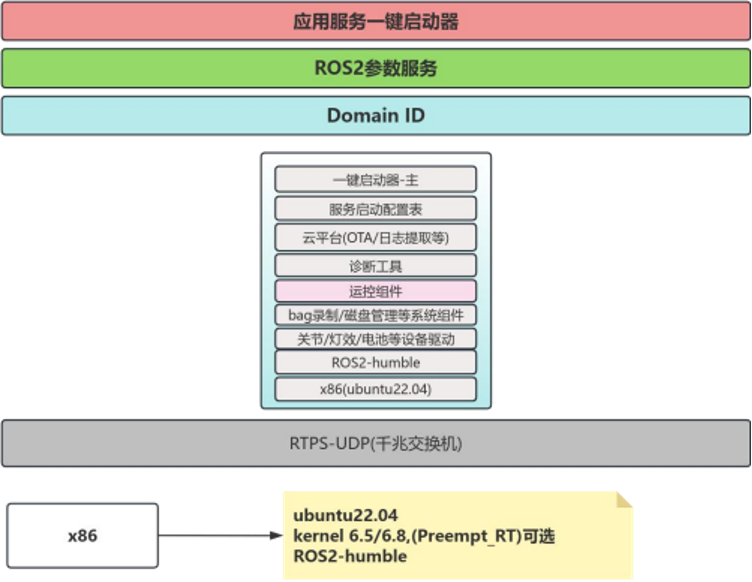
6.2 System Environment Dependencies
To ensure the best development experience and compatibility, it is recommended to develop under Ubuntu 22.04 system. Currently, development under Mac and Windows systems is not supported.
6.3 Runtime Environment Description
6.3.1 Overall Parameter Configuration Path
#x86 global configuration parameter path
/home/ubuntu/data/param
#orin global configuration parameter path
/home/nvidia/data/param
6.3.2 Configuration Parameters and Environment Variables
Configuration parameter location: /home/ubuntu/data/param/ros2_config.txt
ROS_LOG_DIR =/home/ubuntu/logs
ROS2_BAG_DIR =/home/ubuntu/bags
FASTRTPS_DEFAULT_PROFILES_FILE =/home/ubuntu/data/param/dds_profile.xml RMW_IMPLEMENTATION =rmw_fastrtps_cpp
ROS_DOMAIN_ID =0
Note:
ROS_LOG_DIR: Log save location
ROS2_BAG_DIR: Bag package save location
FASTRTPS_DEFAULT_PROFILES_FILE: dds configuration file, by default prohibits using wifi for debugging dds communication;
RMW_IMPLEMENTATION: Middleware type used
ROS_DOMAIN_ID: domain id
Environment variables: /home/ubuntu/data/param/ros2_setup.bash
The above configuration parameters are automatically exported as environment variables when logging into the terminal, or you can manually export them by executing the following command
source /home/ubuntu/data/param/ros2_setup.bash