7. Remote Controller Description
Remote Controller Layout
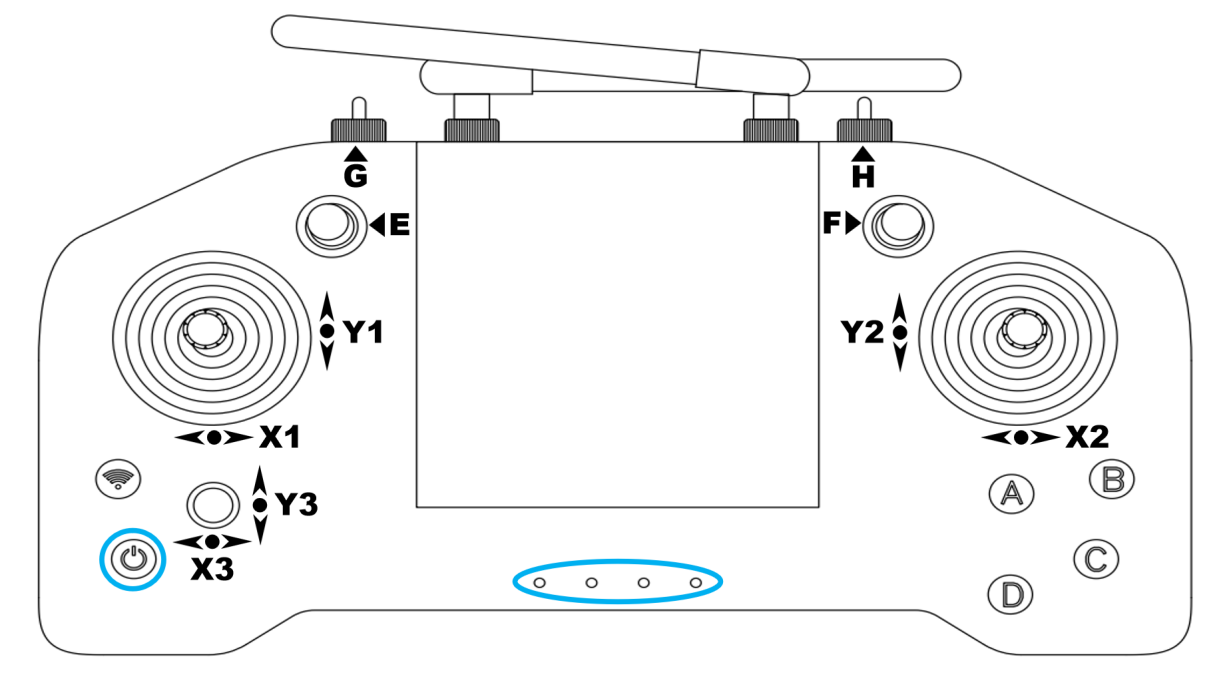
Remote Controller Power on/off
The operation for turning on/off is the same: first, briefly press the power button on the remote control (the button circled in blue in the lower right corner of the diagram above), then immediately press and hold it. A "beep" sound will be heard when the device is successfully turned on, and no sound will be heard when it is successfully turned off (because it has already been turned off).
The indicator lights at the bottom center of the controller will light up from left to right, indicating the controller’s battery level. When 1/2/3/4 lights are on, the corresponding levels are 25% / 50% / 75% / 100%.
Remote Controller Button Description
Lever Definitions
| Lever | Function Position | Position Meaning |
|---|---|---|
| G | System run / joint disable & emergency | Left: user‑defined business mode (reserved) • Middle: normal run mode (default) • Right + C: joint disable |
| E | Function mode selection | Up: user‑defined navigation mode (reserved) • Middle: standard motion control mode (default) • Down: user‑defined business mode (reserved) |
| F | Function mode toggle | Up: voice playback • Middle: motion control (default) • Down: upper‑body control mode (reserved) |
| H | Locomotion mode switch | Left: walk mode • Middle: stand mode (default) • Right: run mode (RL only) |
Button Definitions
Key Function Quick Reference and Explanation
| Key | Function |
|---|---|
| A | Confirm (short press) Voice switch/Stand activation (long press) |
| B | Select (Toggle by number of times) option. |
| C | Stop |
| D | Stop playing/Reset to zero |
A long press is defined as a single button press lasting more than 1 second, while consecutive short presses are defined as multiple short presses with an interval of less than 600ms.
Standard Action Mode
Move the lever to the following positions to enter standard action mode: G (Middle) + E (Middle) + F (Middle)
This mode is the factory default remote control mode, which supports standing, walking, running, and basic motion execution.
Standing mode (H Middle)
- D:Return to zero (reset to the initial position)
- C:Stop
- Press and hold the A button: Enter standing mode
- H, when moved from left to center (without holding down A), is in the default walking preparation state, and can be moved using the joystick.
Standing motion execution (H Middle)
- Short press the B button N times in succession to select the Nth action (1~5: greet, shake hands, bow, dance 1, dance 2).
- Press A to confirm execution.
- Left stick: Up/down tilt forward/backward, left/right tilt left/right.
- Right analog stick: Up and down raise/lower the body while standing; left and right rotate the waist clockwise/counterclockwise.
- C key: Abort the current action (freeze stop).
Walking mode (H left)
- Left stick: Move forward/backward/left/right
- Right analog stick: Move it left or right to control rotation (clockwise/counterclockwise).
- C key: Freeze stop
Running mode (H right)
- The left and right joystick control logic is the same as walking, resulting in higher movement speed.
- C key: Freeze stop
Half-body control mode
Move the lever to the following positions to enter half-body control mode: G (Middle) + E (Middle) + F (Down), then long press A, hear a short beep, then the robot is in half-body control mode. Currently, only Walker Tienkung · Embodied Intelligence is supported, and software version 2.0.5.2 or higher is required.
This mode is a half-body control mode:
- This mode does not support running.
- Except for the C key freeze, the other controls do not affect the upper limb status.
- The upper limbs can receive topic control while standing and walking in this mode, such as teleoperation control and playback of recorded actions.
This mode is suitable for composite control scenarios where only the lower limbs are automatically controlled, while the upper limbs are remotely controlled by the user.
Safety Precautions
- Emergency Stop: Pressing the C key at any time will immediately bring the robot to a standstill. (Assistance is required to maintain balance.)
- Disability Emergency Stop: Pressing G (right) + C can disable the joint, used for high-risk operations.
- The basic operation is G center + E center + F center. Please use other combinations with caution as needed.